
Timer switches automate heaters, exhaust fans and lights to save energy and add convenience. The table below summarizes five top in-wall countdown and programmable timers chosen for reliability, installation flexibility and feature variety.
| Product | Type | Key Feature |
|---|---|---|
| Leviton Countdown Timer Switch (DT104-1LW) | Preset Countdown | Four preset buttons, no neutral required |
| GE Push-Button Countdown Timer (15318) | Push-Button Presets | Six preset times, no neutral required |
| GE SunSmart Digital In-Wall Timer (32787) | Programmable/Digital | Sunrise/sunset and weekly programming |
| BN-LINK 60-Minute Spring Wound Timer | Mechanical/Spring Wound | Up to 60-minute mechanical countdown |
| Minoston WiFi Smart Countdown Timer | Smart WiFi Timer | App and voice control with custom countdowns |
Content Navigation
- Leviton Countdown Timer Switch For Lights And Fans
- GE Push-Button Countdown Timer Switch For Heaters And Fans
- GE SunSmart Digital In-Wall Timer With Programmable Schedules
- BN-LINK Heavy Duty 60-Minute In-Wall Spring Wound Timer
- Minoston WiFi Timer Switch Smart Countdown For Lights And Fans
- Buying Guide: How To Choose A Heater Timer Switch
- 1. Wiring Requirements
- 2. Load Type And Electrical Ratings
- 3. Countdown vs Programmable vs Smart
- 4. Mechanical Durability And Simplicity
- 5. Installation And Compatibility
- 6. Safety And Certifications
- 7. Features That Affect Convenience
- 8. Use Case Comparisons
- 9. Future-Proofing And Smart Home Integration
- 10. Troubleshooting And Support
Leviton Countdown Timer Switch For Lights And Fans

Overview: The Leviton DT104-1LW is a preset countdown switch designed for lights, fans, heaters and exhaust motors. It replaces a standard wall switch and provides four preset time buttons that turn a load on and then automatically turn it off when the selected time expires.
Key Features: Four preset time buttons (30 min, 1, 2, 4 hours), no neutral required via the Green Flex Sleeve, fits in a shallow wallbox, and rated for multiple load types (600W LED/CFL, 1800W incandescent, 1/2 HP fan motor). Ground connection is required for installations without neutral.
Installation And Use: The unit is designed for straightforward replacement of a single-pole switch. The innovative Green Flex Sleeve accommodates installations in older homes without a neutral wire. Compatible loads include LED, CFL, incandescent and motor-driven fans within the listed ratings.
GE Push-Button Countdown Timer Switch For Heaters And Fans

Call 888-896-7031 for Free Local HVAC Quotes – Compare and Save Today!
Overview: The GE 15318 is a push-button countdown timer with six preset durations. It is intended as a simple replacement for single-pole switches in homes that lack a neutral wire, making it suitable for many retrofit scenarios.
Key Features: Six presets (5, 15, 30 minutes, 1, 2, 4 hours), no neutral wire needed, and a wallplate included for quick single-gang installation. It supports lights, fans, exhausts and heaters within standard single-pole switch load ranges.
Installation And Use: The in-wall timer fits rocker-style wallplates and multi-gang setups. Operation is push-button—select a preset to activate the load for that preset duration, then the switch automatically turns the load off at the end of the countdown.
GE SunSmart Digital In-Wall Timer With Programmable Schedules
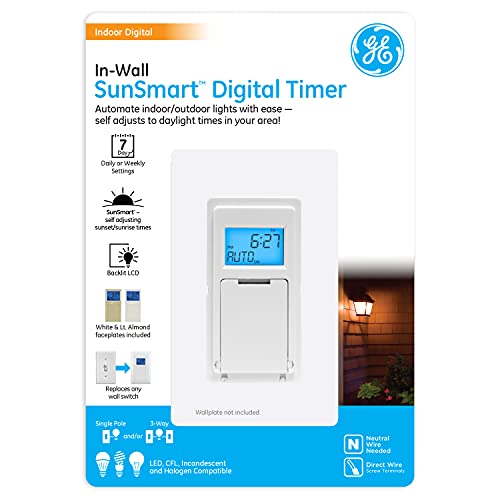
Overview: GE SunSmart (32787) is a digital in-wall timer that supports weekly programming, sunset/sunrise adjustments and random vacation security. It replaces single-pole or three-way switches where a neutral wire is available.
Key Features: SunSmart adjusts for seasonal sunrise/sunset changes, weekly programmable ON/OFF events, random security feature, and compatibility with LED, CFL, incandescent and halogen loads when installed with a neutral. Designed for more complex scheduling than simple countdowns.
Call 888-896-7031 for Free Local HVAC Quotes – Compare and Save Today!
Installation And Use: Requires a neutral wire for installation and can be used in single-pole or three-way circuits. Best suited for users who want daily schedules or automated dusk-to-dawn control rather than single-session countdowns.
BN-LINK Heavy Duty 60-Minute In-Wall Spring Wound Timer

Overview: The BN-LINK mechanical spring-wound timer is a simple, heavy-duty option for bathroom fans or lights. It uses a mechanical spring mechanism to time up to 60 minutes and does not require a neutral wire.
Key Features: Up to 60-minute mechanical countdown, direct replacement for toggle or decorator switch, no neutral required, and fits single or multi-gang switch plates. Mechanical operation eliminates the need for electronics or programming.
Installation And Use: The user rotates or pushes the timer to set a mechanical countdown. Ideal for installations that require a durable, low-complexity timer for intermittent loads such as exhaust fans where electronic timers might be unnecessary.
Minoston WiFi Timer Switch Smart Countdown For Lights And Fans

Overview: The Minoston WiFi Countdown Timer combines preset countdown options with remote app control and voice assistant compatibility. It requires a neutral wire and a 2.4 GHz WiFi network.
Key Features: WiFi-enabled with Smart Life and Minoston app support, voice control via Alexa and Google Assistant, preset countdowns (5, 10, 30 minutes, 1, 2, 4 hours) with app-configurable times, and the ability to create scenes and remote schedules.
Installation And Use: Requires a neutral wire and 2.4GHz WiFi. Offers the most flexibility for remote control and automation, including manual override on the device. Suitable where smart home integration and remote scheduling are priorities.
Buying Guide: How To Choose A Heater Timer Switch
This buying guide highlights the most important factors to consider when selecting an in-wall timer switch for heaters, fans and lights.
1. Wiring Requirements
Neutral Required vs No Neutral: Many modern digital and smart timers need a neutral wire for power. If your switch box lacks a neutral, choose models that explicitly state no neutral required (e.g., Leviton DT104, GE 15318, BN-LINK mechanical). Confirm the wallbox wiring before purchase to avoid returns or extra wiring work.
2. Load Type And Electrical Ratings
Match The Load: Verify the timer’s ratings for LED/CFL, incandescent, motor/fan (HP) and resistive loads. Heaters and some motors draw higher current; pick a timer rated for those loads. Intermatic-style high-amperage timers may be required for electric water heaters or very large loads.
3. Countdown vs Programmable vs Smart
- Countdown Timers: Best for bathrooms and short-run fans; they provide simple preset durations and automatic shutoff.
- Programmable/Digital: Good for lighting schedules, dusk-to-dawn control and weekly routines (e.g., GE SunSmart).
- Smart/WiFi: Offers remote control, voice commands and integration with home automation; requires neutral and WiFi.
4. Mechanical Durability And Simplicity
Mechanical Spring Wound: Durable and straightforward, with no electronics to fail. Best for locations where you only need short-term timing and minimal configuration (e.g., BN-LINK).
5. Installation And Compatibility
Single-Pole vs Three-Way: Confirm whether the replacement is for a single-pole or three-way circuit. Some digital timers support both; others are single-pole only. Check wallbox depth and plate compatibility for decorator or toggle plates.
6. Safety And Certifications
UL/ETL Listings: Choose timers with recognized safety listings for in-wall electrical devices. Ratings and certifications indicate compliance with electrical safety standards.
7. Features That Affect Convenience
- Preset Options: More preset choices reduce the need to manually configure each time.
- Manual Override: A physical on/off override lets users bypass the countdown when needed.
- Indicator LEDs: Provide clear feedback on the active setting or remaining time.
- App Integration: Enables remote scheduling and scene creation for smart timers.
8. Use Case Comparisons
Bathroom Fans: Countdown timers (mechanical or electronic) with 5–60 minute ranges are ideal to clear humidity without manual shutoff.
Space Heaters: Choose a timer rated for resistive loads and sufficient amperage; many simple countdown switches are limited in heater capacity—confirm ratings carefully.
Lighting Automation: For daily schedules or dusk-to-dawn control, programmable digital timers or smart WiFi timers provide flexibility.
9. Future-Proofing And Smart Home Integration
If you plan to expand smart home features, pick a WiFi timer with app and voice assistant support. Ensure compatibility with your preferred ecosystem and check whether it requires a hub or works directly via WiFi.
10. Troubleshooting And Support
Check manufacturer documentation for wiring diagrams and load tables. For retrofit installs in older homes, confirm whether a ground-only option or Green Flex Sleeve is available when no neutral exists. Consider electrician assistance for complex circuits or high-current loads.
Use these considerations to match the best timer type to the intended appliance, wiring environment and desired level of automation.
Tips for Getting the Best HVAC Prices
- Prioritize Quality Over Cost
The most critical factor in any HVAC project is the quality of the installation. Don’t compromise on contractor expertise just to save money. - Check for Rebates
Always research current rebates and incentives — they can significantly reduce your overall cost. - Compare Multiple Quotes
Request at least three estimates before making your choice. You can click here to get three free quotes from local professionals. These quotes include available rebates and tax credits and automatically exclude unqualified contractors. - Negotiate Smartly
Once you've chosen a contractor, use the proven strategies from our guide — How Homeowners Can Negotiate with HVAC Dealers — to get the best possible final price.